

Health, versions and logs
The health indicator
Every page shows the bunker's health at the top left, next to the page title. Every role can see it.
| Indicator | Meaning |
|---|---|
| Healthy (green) | Every check passes. |
| Degraded (yellow) | At least one check needs attention, and none is failing. |
| Down (red) | At least one check is failing, or the bunker did not answer. |
| Checking… (grey) | No answer yet. |
Click the indicator to see each check and its detail, and when it was last checked. Click Check now to check again straight away. Otherwise Bancwr checks every 30 seconds while the page is open.
The Dashboard shows the same checks under Bunker Status, with the bunker's public key.
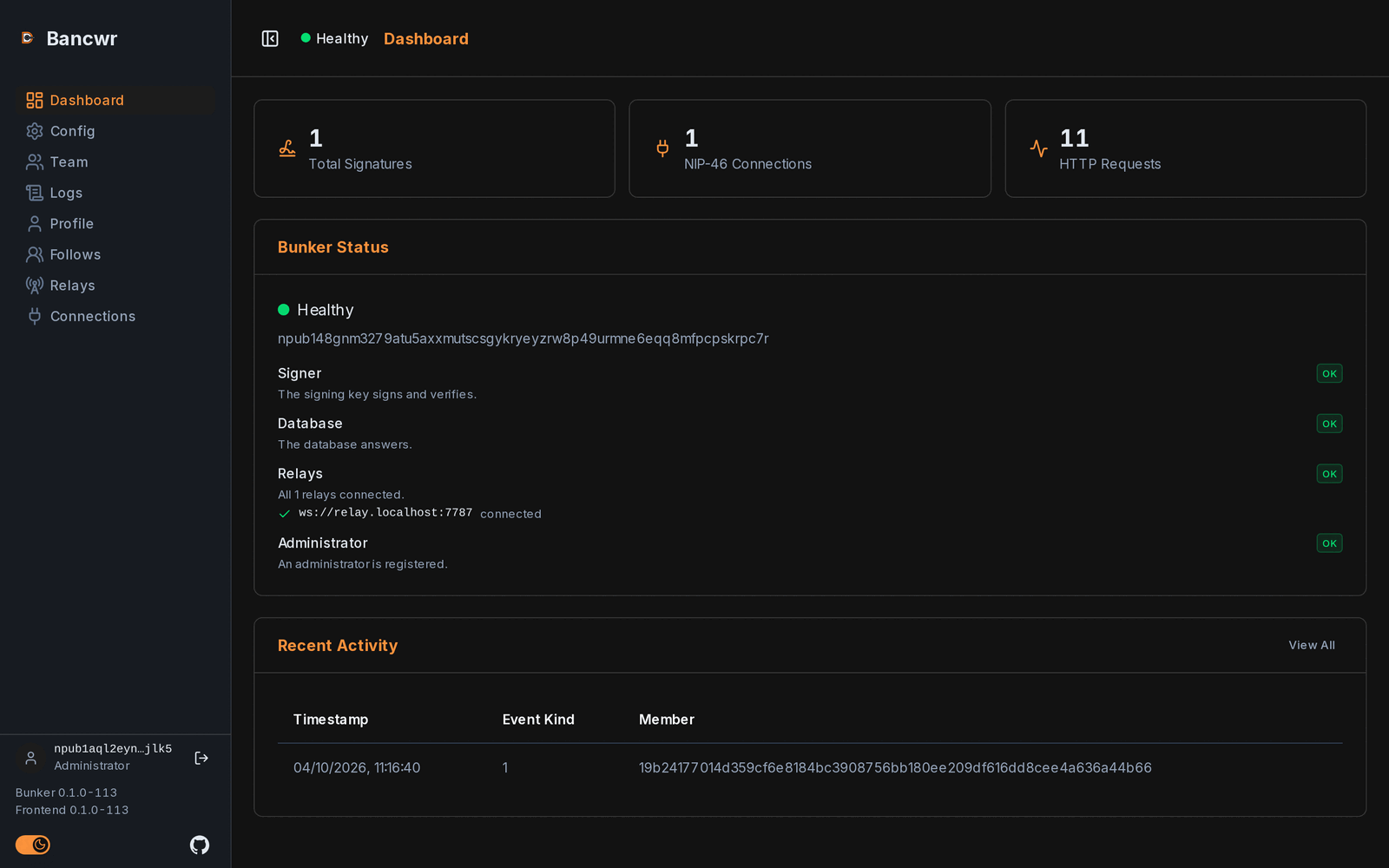
The four checks
Each check shows OK, Needs attention, Failing or Off.
| Check | OK | Needs attention | Failing |
|---|---|---|---|
| Signer | The signing key signs and verifies a test event. The event is never published. | The bunker could not sign. | |
| Database | The database answers. | The database did not answer. | |
| Relays | Every NIP-46 relay is connected. | Some relays are connected, not all. | No relay is connected, or NIP-46 is on with no relays set. |
| Administrator | An administrator is registered. | No administrator is registered, so nobody can manage the bunker. | The team could not be read. |
The Relays check lists each relay and whether it is connected. A relay that is still connecting counts as not connected, so the check reads red for the first few seconds after the bunker starts.
When NIP-46 is turned off, the Relays check shows Off and does not count towards the overall health.
If the bunker does not answer at all, the indicator shows Down with a single Bunker check. The bunker may be stopped, or the dashboard cannot reach it.
The details never include raw errors, file paths or keys. For the full error, read the bunker's log on the server.
Health checks for containers
The health indicator is a report, not a probe. Compose uses a separate check that only asks whether the bunker is running, so a relay going up and down never restarts the container. See Check it is running.
Versions
The sidebar footer shows the version of both parts:
- Bunker and its version.
- Frontend (the dashboard) and its version.
The two are released together and should always match. If they differ, the footer shows Bunker and frontend versions differ. That means the two containers were not updated together. See Updating.
0.0.0 means a build without a version, such as one built from source by hand.
When the sidebar is collapsed, the versions move into a tooltip, and the icon turns to a warning if they differ.
The Dashboard for administrators
Administrators also see, on the Dashboard:
- Total Signatures, NIP-46 Connections and HTTP Requests counts.
- Recent Activity: the last five signatures, with View All linking to the full log.
Users and signers see the bunker's health only.
The Logs page
The Logs page shows the Signing Activity Log. Only administrators can open it.
It lists the last 100 events the bunker signed, newest first. Only successful signatures are logged.
| Column | Shows |
|---|---|
| Timestamp | When the event was signed. |
| Event Kind | The kind of event signed. |
| Member | The team member the app's connection was made for. |
| App | The key of the app that asked for the signature. |
If the member has since been removed, the Member column shows their shortened npub instead of their name. Unknown means no connection accounts for the signature.
The Config page
The Config page shows the bunker's public key, and where the signing key was loaded from. Only administrators can open it.
The signing key is set when the bunker starts, and the private key is never shown.
The Bunker relays section is where administrators choose the relays apps reach the bunker through. See NIP-46 and the bunker's relays. If NIP46_RELAYS is set, the section shows that list read-only.