

Approving requests
How apps ask Symudol
Nostr apps on your phone talk to Symudol through NIP-55, the Android signer standard. There are two ways a request arrives.
With your review
The app opens Symudol with a nostrsigner: request. Symudol comes to the front, switches to the Requests tab and shows the request. When you approve or reject, Symudol sends the answer back to the app.
If the vault is locked, you unlock first. See A request is waiting.
In the background
An app can also ask in the background, without opening Symudol. Symudol answers these only when:
- the vault is unlocked, and
- you have already remembered a decision for that app and that kind of request.
In every other case, Symudol gives no background answer and the app has to open Symudol so you can review the request.
From a website
A website on your phone can also send a nostrsigner: request through the browser. Symudol shows it for review in the same way. The result goes back through the website's return link or, if there is none, is copied to the clipboard.
Decisions for browser requests cannot be remembered, because Symudol cannot tell which website sent them.
Supported requests
| Request | What it does |
|---|---|
get_public_key | Shares the active identity's public key. |
sign_event | Signs a Nostr event with the active identity. |
sign_message | Signs a plain message. |
nip04_encrypt / nip04_decrypt | Encrypts or decrypts a NIP-04 message. |
nip44_encrypt / nip44_decrypt | Encrypts or decrypts a NIP-44 message. |
decrypt_zap_event | Decrypts a zap event. |
Symudol reviews one request at a time. If a second request arrives while you are reviewing one, Symudol refuses it with "Symudol is already reviewing another NIP-55 request", unless you have already remembered a decision that covers it.
The Approval Request screen
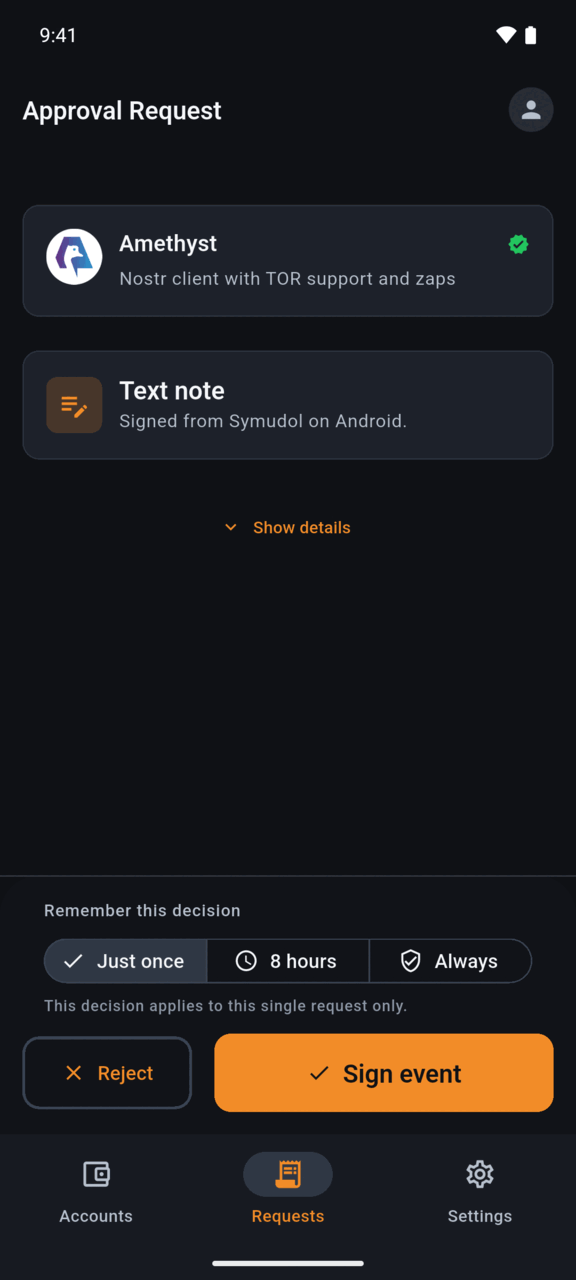
From top to bottom, the screen shows:
Source warning
If Android could not confirm which app sent the request, you see Unknown Provenance: "The requesting application is not in your verified list. Exercise caution."
If the source is known to be untrusted or invalid, you see Untrusted Source in red.
The requesting app
The app's name and icon. A green check mark means Android identified the app and its signing certificate. Some well-known Nostr apps also show a short description.
What is being asked
- Signing an event: the event type, such as Text note, and a preview of its content. Some event types also show a Risk note, for example events that change your profile or contact list, and event types Symudol does not recognise.
- Sharing your public key: Connect to signer, or Permissions requested with the list of permissions the app asked for.
- Encrypting or decrypting: the operation, such as NIP-44 Decrypt. Decryption is marked "Sensitive decrypt operation — review carefully". You also see the PEER PUBLIC KEY and a PAYLOAD PREVIEW.
Show details
Tap Show details to see more. For an event this includes the NIP-55 METHOD, the PERMISSION IF REMEMBERED, the CONTENT, the CREATED AT time, the TAGS, and the full event as JSON.
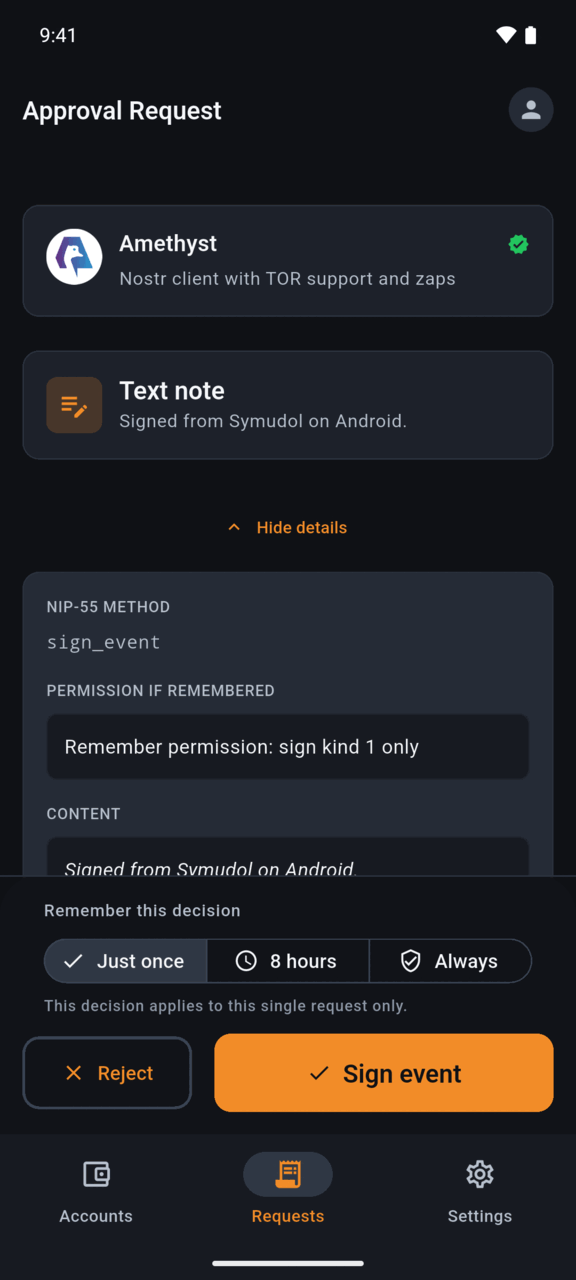
Remember this decision
When Symudol can remember a decision for this app, you can choose:
- Just once: "This decision applies to this single request only."
- 8 hours: "Requests from this app will be auto-approved for 8 hours."
- Always: "All future requests from this app will be auto-approved."
This choice is not offered for browser requests, for apps Symudol cannot identify, or when the request is for a different account than the active one.
The buttons
- Reject refuses the request.
- The approve button depends on the request:
- Sign event signs the event.
- Share public key shares your public key.
- Encrypt or Decrypt runs the operation. In the current development version, a
sign_messagerequest also uses the Encrypt button.
After signing, you see Event signed: "The event was signed locally with your selected identity. It has not been published by Symudol." Symudol never publishes events. The app that asked does that.
If signing fails, tap Dismiss failed request to clear it.
When there is nothing to review, the Requests tab shows No active requests.
What remembering covers
A remembered decision applies to one app, the active identity, and one kind of request:
- Signing: events of the same kind only. For example, approving a text note covers text notes, not profile updates.
- Encrypting: messages to the same peer.
- Decrypting: messages from any peer. A remembered decrypt also covers zap events.
- Sharing your public key: if the app listed other permissions when it asked for your public key, those are remembered too. Read the Permissions requested list before you choose 8 hours or Always.
8 hours ends after 8 hours. Always has no end date.
If you reject with 8 hours or Always selected, Symudol remembers the rejection with no end date. Future requests of that kind from that app are refused without asking.
Trusted Nostr apps
To review remembered decisions, open Settings, then Trusted Nostr apps.
Each app shows:
- Its name and Android package name.
- The identity the decisions belong to.
- When it was last used.
- Each remembered decision, such as "Allowed • Sign kind 1", with its status (No expiry, Expires ... or Expired) and when it was created and last used.
To remove decisions:
- Tap the bin icon next to one decision to revoke it.
- Tap Revoke app to remove every decision for that app.
- Tap Revoke all at the top to remove every remembered decision. "Future requests will ask again."
If nothing is remembered, you see "No remembered NIP-55 app permissions yet."